
MCP (Model Context Protocol)

MCP originated on 25 November 2024 Anthropic published article
This paper refers to one of the most important articles in the world. - It's a piece., part of the introduction and code is derived from this text.
MCP Introduction
MCP (Model Context Protocol, Model Context Protocol) defines the way in which context information is exchanged between the application and the AI model. It provides a protocol interface for tools, data sources and alert templates to enable developers toConnect data sources, tools and functions to AI models in a consistent manner。
MCP aims to reduce duplication of tools when accessing. Developer does not have to rewrite a login and callback set for each client; the same Server can be found and called by different host applications as long as the client supports MCP.
MCP represents two Agent approaches: the former relies on developers to adapt and harmonize such interfaces; the latter allows LLM to simulate human operations by visual recognition of what is near human sight.
Let's see why MCP is here. The early developers mainly rely on prompt to stuff the scene information into models, but handwritten prompt alone is difficult to maintain after the growing number of tools, files, databases and business situations.
Before the MCP was born, we usually manually paste the scene information to complement the prompt. The problem has changed, and it has become more and more.ManualIt's getting harder and harder to put information in a stable format.
Many LLM platforms were introduced to address manual prompt limitations function call function. Models can be used to access data or perform operations by predefined functions, where needed, with increased automation and performance.
Function call platform is highly dependent, the difference between the different LLM platform 's funcing call API is greater, and the adaptation cost increases; when switching to the platform, most of the codes are often rewritten.
Data and tools are objective in themselves.We want to connect them to models that are smoother and more uniform. Anthropic designed MCP based on this, making it easier for LLM to access data or to call tools. The advantages of MCP include:
- Ecology - MCP offers a lot of ready plugs, your AI can use directly.
- Uniformity - No restriction on a specific AI model, any model that supports MCP can be switched.
- Data security - You left your sensitive data on your computer, not all of it. Because we can design our own interfaces to determine which data to transfer.
Detailed methods for MCP use, reference Document The relevant SDKs were presented with some examples.
Whether it is FUNKING or MCP, the model's own Toolcall capabilities still stem from the original JSON Schema Output; we simply add functions to it, and do not change the model itself.
MCP Architecture
Basic components
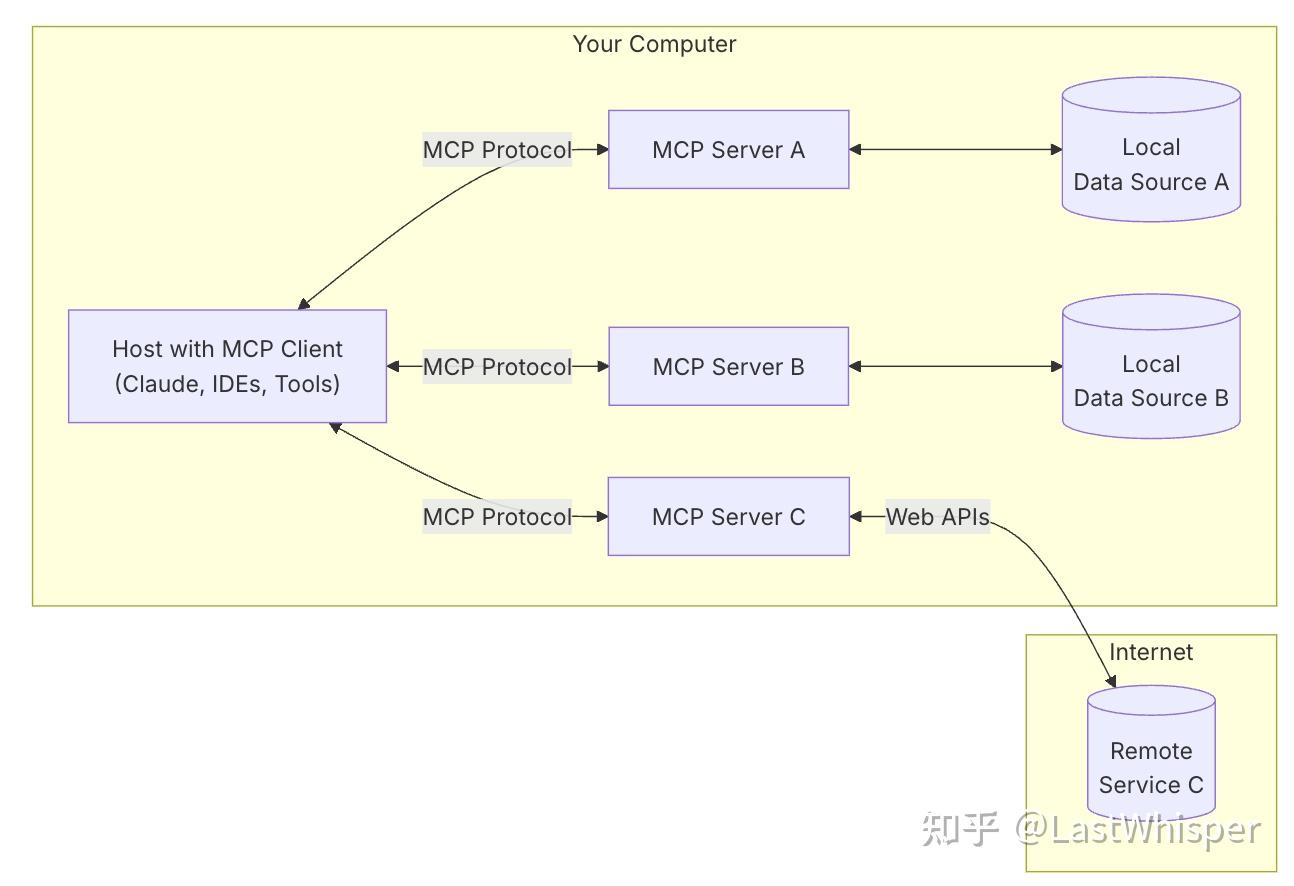
MCP consists of three components: Host, Clint and Server. They can be understood in a practical context:
Assuming you are asking with Claude Desktop (Host):"What documents are on my desktop?"
- HostClaude Desktop, as Host, receives your questions and interacts with Claude.
- Client: When Claude Model decides to access your file system, the embedded MCP Clinic will be activated. This Clinent is responsible for establishing connections with the appropriate MCP Server.
- Server: In this example, the file system MCP Server will be called. It is responsible for executing the actual file scanning operation, accessing your desktop directory and returning the list of documents found.
Of which Host handles semantic and interactive needs, Clit interacts with Server as an intermediary, Server accesss the database to obtain data and returns to Host to generate answers.
Process: Your question →Claude Desktop (Host)→Claude Model →Claude requires file information →MCP Clinic to connect to the →MCP Server → to execute the operation →Claude returns the result →to generate answers → on Claude Desktop.
This architecture allows LLM to access tools and data sources in different settings; developers need only develop corresponding MCP Servers, without concern for the details of the Host and Clarents' realizations.MCP Server : A program that provides context information to MCP clients can run on remote hosting servers or locally.
Transfer level: stdio, Streamable HTTP, and why much of the information is still written on SSE
The understanding of the basic components also requires a clear understanding of how they communicate and what changes have occurred in the communication mechanisms. The standard transmission in the current code is mainly stdio and Streamable HTTPI'm sorry. And... SSE The following is a historical legacy of the official document: Many of the online materials refer to the old version of the information and are not included in the MCP follow-up update. See the quotations in this section.
| Dimensions | stdio |
Streamable HTTP |
|---|---|---|
| Start with | Client Start Server Subprocess | Server independently run and expose HTTP endpoint |
| Deployment location | Usually on the plane. | It's available on the machine and more commonly in remote services. |
| Message Channel | JSON-RPC, GO! stdin/stdout♪ Log goes ♪ stderr |
JSON-RPC go HTTP POST/GET, if necessary SSE Fluid Return |
| Typical scene | Local IDE, desktop end tool, file system and script tool | Cloud tool, team-sharing service, connector to certify |
| Certification and security | Dependence on in-house privileges, start-up commands, environment variables and client configuration | Dependence on HTTP assurance, authorization process and network boundaries |
| Remote and Multi-Custal | Not suitable for direct use as remote shared service | More suitable for accessing multiple clients as remote service |
stdio Understandable as the most localized connection: Clit started MCP Server subprocesses like a father process and then wrote JSON-RPC requests into Server stdinFrom Server stdout Read JSON-RPC response. Because... stdout It's already been negotiated, so the debugging log should have been written. stderrOtherwise, it is easy to contaminate protocol data. (Do not write in a locally run MCP Server and Clean code)printOr other uses.stdiofunction)
Streamable HTTP More like our familiar remote service: MCP Server run independently, Clean connects a MCP endpoint through HTTP POST/GET Send and receive protocol messages. Servers are available when needed SSE Keep pushing messages, so... SSE Not today with stdio , which is a fluid mechanism in HTTP transfers.
Version DescriptionThe blogger says:Version 2024-11-05The remote transmission in it is called
HTTP with SSEFrom Version 2025-03-26Started byStreamable HTTPreplace;update 2025-11-25 Transmission CodeAnd bystdioandStreamable HTTPAs standard transmission. So read it in the old article.SSE/HTTP+SSEIt is not necessarily wrong, it is just the version that is earlier.
Communications before the start of the mission
MCP Start with life cycle management, client sending initialize Request for a link and a consultative support function. After initialization is successful, the client sends a notice indicating that it is ready. In the initialization process, the MCP client manager that AI applies will establish connections to the configured server and store its functionality for subsequent use. The application uses this information to determine which servers provide specific types of functionality (tools, resources, tips) and whether they support real-time updates.
When a connection is created, the client sends it tools/list Request, get the Server exposure tool list. Responding tools arrays containing each tool name、description、inputSchema - What?The array structure allows a Server to open multiple tools at the same time and allows the client to display and call one by one.
Each of the response 's target objects contains several key fields:
name: The only identifier in the server namespace.title: user-friendly display name of the tool that the client can show to the userdescription: detail the functionality of the tool and when it will be used.inputSchema: a JSON Schema to define the expected input parameters, to support type validation and to provide clear documentation of the required and optional parameters.
Host or Clear consolidates the tools connected to MCP Server into a tool registration form, and then gives the tool description to the model for reference. The model determines whether to call on the basis of user requests and tool descriptions; the true execution is still sent back to the client for the parameters.
How do models determine the choice of tools?
The basic structure should be as
- Client (Host) sends your questions to Claude.
- Claude analyses the tools available and decides which one (or more) to use.
- Client executes the selected tool through MCP Server.
- The results of the tool are returned to Claude.
- Claude constructs the final prompt with the results and generates a response in the natural language.
- Response to final display to user!
This call can be made in two steps:
- The LLM (Claude) determines which MCP Servers use.
- Implement corresponding MCP Server and reprocess the results.
The overall logical reference figure, which is shown in the watermark
Tool Selection
First step, first step.How does the model determine which tools should be used?
Read the code and find out that the model is used to determine which tools are currently available through the Prompt. We're through.Passing the specific use description of the tool to the model in text, to provide models with an understanding of the tools and the real-time selections.
That's...
.. # 省略了无关的代码 async def start(self): # 初始化所有的 mcp server for server in self.servers: await server.initialize() # 获取所有的 tools 命名为 all_tools all_tools = [] for server in self.servers: tools = await server.list_tools() all_tools.extend(tools) # 将所有的 tools 的功能描述格式化成字符串供 LLM 使用 # tool.format_for_llm() 我放到了这段代码最后,方便阅读。 tools_description = "\n".join( [tool.format_for_llm() for tool in all_tools] ) # 这里就不简化了,以供参考,实际上就是基于 prompt 和当前所有工具的信息 # 询问 LLM(Claude) 应该使用哪些工具。 system_message = ( "You are a helpful assistant with access to these tools:\n\n" f"{tools_description}\n" "Choose the appropriate tool based on the user's question. " "If no tool is needed, reply directly.\n\n" "IMPORTANT: When you need to use a tool, you must ONLY respond with " "the exact JSON object format below, nothing else:\n" "{\n" ' "tool": "tool-name",\n' ' "arguments": {\n' ' "argument-name": "value"\n' " }\n" "}\n\n" "After receiving a tool's response:\n" "1. Transform the raw data into a natural, conversational response\n" "2. Keep responses concise but informative\n" "3. Focus on the most relevant information\n" "4. Use appropriate context from the user's question\n" "5. Avoid simply repeating the raw data\n\n" "Please use only the tools that are explicitly defined above." ) messages = [{"role": "system", "content": system_message}] while True: # Final... 假设这里已经处理了用户消息输入. messages.append({"role": "user", "content": user_input}) # 将 system_message 和用户消息输入一起发送给 LLM llm_response = self.llm_client.get_response(messages) ... # 后面和确定使用哪些工具无关
class Tool: """Represents a tool with its properties and formatting.""" def init( self, name: str, description: str, input_schema: dict[str, Any] ) -> None: self.name: str = name self.description: str = description self.input_schema: dict[str, Any] = input_schema # 把工具的名字 / 工具的用途(description)和工具所需要的参数(args_desc)转化为文本 def format_for_llm(self) -> str: """Format tool information for LLM. Returns: A formatted string describing the tool. """ args_desc = [] if "properties" in self.input_schema: for param_name, param_info in self.input_schema["properties"].items(): arg_desc = ( f"- {param_name}: {param_info.get('description', 'No description')}" ) if param_name in self.input_schema.get("required", []): arg_desc += " (required)" args_desc.append(arg_desc) return f""" Tool: {self.name} Description: {self.description} Arguments: {chr(10).join(args_desc)} """
Models determine which tools to use by providing structured descriptions of all tools and example for the few-shot。
Tool implementation and structural feedback
The tool is more straightforward in implementing this step. Take the last step, we send the system program with the user message and then receive the model response. After the model analyses the user request, it is decided whether the tool needs to be called:
- When no tools are needed: The model directly generates natural language responses.
- When tools are needed: Model output structured JSON format tool call request.
The response contains a structured JSON format tool to call, and the client will execute the corresponding tool according to this json code. If the model is implemented tool call, the result of the tool implementation result will be joined with system program and user messageResendTo the model, request the model to generate the final response. If the json code is in trouble or the model is hallucinating, we'll skip the invalid call request.
... # 省略无关的代码
async def start(self):
... # 上面已经介绍过了,模型如何选择工具
while True:
# 假设这里已经处理了用户消息输入.
messages.append({"role": "user", "content": user_input})
# 获取 LLM 的输出
llm_response = self.llm_client.get_response(messages)
# 处理 LLM 的输出(如果有 tool call 则执行对应的工具)
result = await self.process_llm_response(llm_response)
# 如果 result 与 llm_response 不同,说明执行了 tool call (有额外信息了)
# 则将 tool call 的结果重新发送给 LLM 进行处理。
if result != llm_response:
messages.append({"role": "assistant", "content": llm_response})
messages.append({"role": "system", "content": result})
final_response = self.llm_client.get_response(messages)
logging.info("\nFinal response: %s", final_response)
messages.append(
{"role": "assistant", "content": final_response}
)
# 否则代表没有执行 tool call,则直接将 LLM 的输出返回给用户。
else:
messages.append({"role": "assistant", "content": llm_response})
Accordingly:
- Tool documents directly affect the quality of the model selection tool. Name, docstring and parameter description are written to avoid writing only one general verb.
- MCP tool selection continues to rely on models to understand text descriptions. The more the model understands the boundaries of tasks and tools, the more stable the call effect.
The blogger adds:@mcp.tool() It's a direct function name and docstring It's a tool. name and description。 Parameters and return value information will also be derived from type labels,docstring or SDK for the interpretation of a function signature. So when writing MCP Tool, the function name and description text are not an annotated text, they are the interface documents that the model sees.
MCP Servers
MCP servers are procedures to make specific features available to AI applications through standardized protocol interfaces. This is also the layer that developers need to reach. The server provides functionality through three basic components:
- Tools LLM can call these functions on its own initiative and decide when to use them upon request. Tools can write to a database, call an external API, modify files or trigger other logic.
- Resources Passive data sources Provide context information
- Prompts Hint Pre-engineered command templates that show the model how to use specific tools and resources.
Tools are fixed-form interfaces that LLM can access. MCP to validate with JSON Schema. Each tool performs a single operation and has clearly defined inputs and outputs. The tool may require prior user clearance, which helps ensure that users maintain control over the operation of the model. LegalProtocol operations Includingtools/list and tools/call Returns the performance results of the description arrays and tools for the tool, respectively.
The tools are controlled by models, which can be automatically detected and called upon by artificial intelligence models. However, MCP also maintains manual monitoring through a variety of mechanisms, including the opening and closing of user control models, pre-sets and the execution of approvals for each tool.
Resources provide structured information access, AI ApplicationThis information is read and then presented to the model as context. It differs from the tool in that resources are primarily responsible for providing context and not for enabling the model to implement the action. Resource supportDirect resourcesURI, which points to fixed data; also supportsResource Templates, which is the dynamic with parameters. Relevant Protocol operations Including resources/list、resources/templates/list、resources/read、resources/subscribeI'm sorry. Resource discovery and access is application-driven and the interface format is determined by the specific client.Resources is called by Application rather than directly by the model.
The hint provides a reusable template. They allow MCP server authors to provide parameterized indicators for field tasks or to demonstrate how best to use the MCP server. LegalProtocol operations Includingprompts/list prompts/get The hint is controlled by the user and requires a visible call.Prompts are called by users rather than by models
Only the tool for LLM is the Tools, which are used by the other parts of the program, and which are not the focus of consideration, and we will focus only on the Tools for building the MCP Servers themselves in our subsequent presentations and allow LLM to use the Tools. Actually... For most AI developers, we just need to care about the realization of Server.
MCP Servers is responsible for harmonizing exposure tools and other elements for Agent dynamic detection and call without having to coding the tool sheet (need to work with Clint). This is the MCP's main value. Local stdio Server often runs in an independent subprocess, remote Streamable HTTP In the mode, Server is more like a service.
Connecting Clinent to Servers
As can be seen from the previous steps, MCP runs on the general level of Host, Clean, Server. Users use Claude Desktop, Claude Code, VS Code, such as Host/Application; they usually have a Client that supports MCP; Server runs locally or in clouds.If only using MCP, it would not affect understanding if Host and Client were to be seen as a whole for the time being.
When only MCP Server can be done, you can not care how it works within the Clinent. MCP serves to fix the interaction between Server and LLM into a set of protocols. The developers are primarily responsible for achieving Server and deploying it to the cloud or handing it over to the user for local installation. To allow the model to identify MCP Server, only to configure it in the client that supports MCP: Local stdio Server usually configures start-up commands, remote Streamable HTTP Server usually configures URL/endpoint and authentication information.
This one down here, JSON, is local. stdio Typical configuration for server:
{
  "mcpServers": {
    "filesystem": {
      "command": "npx",
      "args": [
        "-y",
        "@modelcontextprotocol/server-filesystem",
        "/Users/username/Desktop",
        "/Users/username/Downloads"
      ]
    }
  }
}
of which filesystem is the name displayed by the server in Claude Desktop or other client.command It's the enforceable program that Client is about to start.args Writes automatically installed parameters in lycée, server package name, and directory that allows Server access. Rebooting the Clit will be possible with modifications to the configuration, and the tool will be used in the follow-up of the model.
For Local stdio Server, MCP Server is actually configured to fine-tune and split manual commands, and there is no difference in the nature of manual MCP Server running commands, which are pulled by Client and then passed stdin/stdout Exchange protocol messages.
Now we have basically all the clients supporting us to connect to remote tools. Compared to local tools, remote MCP server usually passes Streamable HTTP Exposure of a URL/endpoint, Clit or Custom Contractors to act as a bridge between Claude and a remote MCP server. In order to ensure that access is legal, most remote Servers require authentication or authorization, which is determined by the corresponding Clit product and remote service, and is sufficient to act as a reminder. When the connection is successful, the remote server resource and tip message will appear in your Claude dialogue.
Different ways of deploying MCP Servers are different, with all Servers of some platforms being controlled in one JSON, and some of the Clients achieve more independent configuration logic, distinguishing local stdio Servers and Remote Streamable HTTP Servers
MCP Server based on Python SDK
For most AI developers, we just need to care about the realization of Server. This requires some understanding of MCP Server's working principles to ensure the expansiveness of codes.
MCP is valuable in removing the capability upgrade from the Agent main code. Traditional Function Calling often requires changes to the clit code or hint; MCP Server can rediscover the tool by configuration access. The cost is that the tool search and the exposure to the capacity will be an additional layer of abstraction. Complex projects still require a budget for their own handling tools for naming, authorizing, searching quality and context.
Below is an example of a MCP Server with Python SDK.mcp FastMCP in the package will help us with the details of the protocol. This package also contains terminal tools and CIline associated codes, but is not used temporarily when writing Server.
# 导入开发MCP以及工具本身需要的Packages import os from pathlib import Path from mcp.server.fastmcp import FastMCP创建 MCP Server 也就是一个mcp对象,此时他还是空的,并给了这个Server一个名字
mcp = FastMCP("桌面 TXT 文件统计器")
#使用@mcp.tool() (装饰器)修饰了一个普通的Python函数,这样就从python函数到了一个MCP tool #Python装饰器是一个非常强大的工具,不过我们再这里不再强调他 #为函数增加了输出类型提示int,这可以被后面的MCP SDK解析 #使用了文档字符串 撰写了doc 这个doc也会被MCP SDK解析 位于模块、类、方法或函数的第一个这样的注释为doc #代码内部就是普通函数逻辑,很简单 @mcp.tool() def count_desktop_txt_files() -> int: """Count the number of .txt files on the desktop.""" # Get the desktop path username = os.getenv("USER") or os.getenv("USERNAME") desktop_path = Path(f"/Users/{username}/Desktop")
# Count .txt files txt_files = list(desktop_path.glob("*.txt")) return len(txt_files)#装饰了另一个tool,一个Server里面可以拥有多个Tool很合理 @mcp.tool() def list_desktop_txt_files() -> str: """Get a list of all .txt filenames on the desktop.""" # Get the desktop path username = os.getenv("USER") or os.getenv("USERNAME") desktop_path = Path(f"/Users/{username}/Desktop")
# Get all .txt files txt_files = list(desktop_path.glob("*.txt")) # Return the filenames if not txt_files: return "No .txt files found on desktop." # Format the list of filenames file_list = "\n".join([f"- {file.name}" for file in txt_files]) return f"Found {len(txt_files)} .txt files on desktop:\n{file_list}"
#mcp.run(): 这是服务器启动指令,在本地 stdio 示例中启动后会等待来自标准流的协议请求 if name == "main": # Initialize and run the server mcp.run()
MCP Clinic based on Python SDK
What's Client doing?
Look at the Clit's realization. For most tool developers, the Clit is provided by such host products as Claude Desktop, Cursor, Claude Code; all you need to know is how to fit MCP Server instead of making it happen.
But if MCP is to be embedded in self-study, then it is necessary to know what the Client in SDK has done.
A distinction must be made between Host and Clinent when studying the framework. Host is the layer that carries the Agent logic: maintaining dialogue, deciding when to call the tool, processing the loop and terminating conditions. MCP Clinic is an internal protocol adapter, which connects Server, column tools, adjusts and reads resources.Core Agent is on the Host level; the Clint level is responsible only for tool discovery and protocol communication.
Client does only two things: access to tools, resources and alerts exposed by Server; and call or read from the Host/Agent decision-making implementation tool. The Client code in SDK is intended to encapsulate these protocol actions. The multiple tool call cycle does not belong to the MCP Clinic itself, and the number of calls and when they will stop is still determined by the Host Layer code.
Host + Clent + Server combines to achieve one thing:Agent is responsible for decision-making and MCP is responsible for providing the capability interface.
So,MCP Clinic is not Agent; it is Agent's protocol/ bus layer using MCP capabilities. MCP does not itself do reasoning, planning, memory or circulation control. It allows Host/Agent to discover tools through a standard interface, capture context, call external capabilities and decorate tools and data from the Host code.
If you re-use a high-level product like Claude Code SDK, you're connected to an Agent Runt that already contains the Host decision logic, not the nudity MCP Clinic. Naked Client only handles protocols; high-level SDKs may contain react loops, tool selection and the termination logic of the task.
A simple example of Client and Host.
A simple example of what was achieved by Client and Host is presented below, which is used to refer to the achievements of the Client and its use by Host.
This example is local. stdio Transport, so Clinent will start the Python subprocess and create it through standard streams and it will be created ClientSessionI'm sorry. If it's a remote Streamable HTTP, Host and Clinic still have similar duties, but the bottom connector will be from stdin/stdout Replace with HTTP endpoint.
import asyncio import json import os from mcp import ClientSession, StdioServerParameters from mcp.client.stdio import stdio_client, get_default_environmentdef build_env() -> dict: """ 构建传递给 MCP Server 的环境变量。
MCP Server 运行在一个独立的子进程中,因此需要显式传递必要的环境变量。 本函数首先获取 SDK 提供的默认安全环境配置,然后将我们需要增强的 数据路径变量 'ENHANCED_DATA_PATH' 注入其中。 """ # 1. 获取默认环境:包含 PATH 等基础变量,确保 Python 能正常运行 env = get_default_environment() # 2. 注入自定义变量:让 Server 能够通过环境变量获取配置信息 enhanced = os.environ.get("ENHANCED_DATA_PATH") if enhanced: env["ENHANCED_DATA_PATH"] = enhanced return envdef server_params(server_py: str = "utils/mcp_server.py") -> StdioServerParameters: """ 构造 Server 的启动参数 (StdioServerParameters)。
这里指定了如何启动 MCP Server: - command: 使用 "python" 命令 - args: 传递脚本路径作为参数 - env: 使用 build_env() 构建的环境变量 """ # 使用绝对路径,避免因 cwd (当前工作目录) 不同导致找不到文件 server_py = os.path.abspath(server_py) return StdioServerParameters(command="python", args=[server_py], env=build_env())def parse_result(result): """ 解析 MCP Protocol 的返回结果
CallToolResult。MCP 的返回结果结构可能包含 TextContent, ImageContent 或 EmbeddedResource。 本函数的目的是将其简化为 Host 易处理的字典或数据结构。 """ # 结果的主要内容都在 content 列表字段中 content = getattr(result, "content", None) if content: # 策略 1: 优先提取结构化数据 (EmbeddedResource 或类似 data 字段) for item in content: data = getattr(item, "data", None) if data is not None: return data # 策略 2: 提取文本内容,并尝试解析为 JSON for item in content: text = getattr(item, "text", None) if isinstance(text, str): try: return json.loads(text) except Exception: # 如果不是 JSON,则直接返回原始文本 return {"raw_text": text} # 兜底:如果无法解析,返回原始对象的字典包装 return {"result": result}async def list_tools(server_py: str = "utils/mcp_server.py"): """ Client 核心功能:列出 Server 提供的所有工具。
步骤: 1. stdio_client: 启动子进程,建立 stdio 管道。 2. ClientSession: 在管道上建立 MCP 协议会话。 3. initialize: 执行握手协议。 4. list_tools: 发送 tools/list 请求。 """ async with stdio_client(server_params(server_py)) as (read, write): async with ClientSession(read, write) as session: await session.initialize() resp = await session.list_tools() # 提取关键元数据 (name, description, schema) 返回给 Host 用于决策 return [ {"name": t.name, "description": t.description, "input_schema": t.inputSchema} for t in resp.tools ]async def call_tool(tool_name: str, arguments: dict | None = None, server_py: str = "utils/mcp_server.py"): """ Client 核心功能:调用指定工具。 """ arguments = arguments or {} async with stdio_client(server_params(server_py)) as (read, write): async with ClientSession(read, write) as session: await session.initialize() result = await session.call_tool(tool_name, arguments) return parse_result(result)
— Host Agent 使用示例 (Simulated) —
async def host_agent_demo(): """ 模拟 Host (Agent) 使用 Client 进行工具发现和调用的过程。 这里的 Host 扮演“决策者”的角色,而 Client 扮演“执行者”。 """ print("=== Host Agent Started ===")
# 1. 发现能力 (Tool Discovery) # Host 询问 Client:目前有哪些工具可用? print("\n[Host] Discovering tools...") # 假设 utils/mcp_server.py 是我们编写好的 Server 脚本 tools = await list_tools("utils/mcp_server.py") print(f"[Host] Found {len(tools)} tools:") for t in tools: print(f" - Name: {t['name']}") print(f" Desc: {t['description']}") if not tools: print("[Host] No tools found. Exiting.") return # 2. 模拟 LLM 决策过程 # 假设 LLM 根据 Prompt 和工具描述,决定调用 'list_desktop_txt_files' # 注意:这里的逻辑通常由 LLM 完成 target_tool = tools[0]["name"] # 简单起见,直接取第一个 print(f"\n[Host] DECISION: I will use the tool '{target_tool}' to gather information.") # 构造通过 prompt 分析出的参数 (此处为硬编码示例) args = {} # 3. 执行工具 (Tool Execution) print(f"[Host] Requesting Client to execute '{target_tool}'...") result = await call_tool(target_tool, args, "utils/mcp_server.py") # 4. 获取结果 print(f"[Host] Execution Result received:") # 结果可能是列表、字典或文本,这里做简单的打印 print(result) print("\n=== Host Agent Finished ===")
A complete local stdio collaborative process
Once. call_tool() The end-to-end collaborative process (Agent ↔ MCP Clent ↔ MCP Server). It's still local. stdio transport。
Agent Decision-making
DecisionToolsNodeSelect the tool to execute.ExecuteToolsNode
Host Call MCP Clinic
ExecuteToolsNodeCall:call_tool("utils/mcp_server", tool_name, {})
MCP Clint Start Server Subprocess
- Parameters for the start of the construction process:
StdioServerParameters(command="python", args=[server_script_path], env=...)
- Parameters for the start of the construction process:
MCP SDK Creates local stdio channel (IPC)
stdio_client(server_params)Create stdin/stdout channel for main and subprocesses
MCP SDK Launch RPC Call
session.initialize()Shake hands, please.session.call_tool(tool_name, arguments)Launch Tool Call
MCP Server Implementation Tool
- Server-end corresponding
@mcp.tool()Function triggers - Call after internal reading/loading of data
analysis_toolsComplete statistical or chart generation
- Server-end corresponding
Return to Clinent
- Server returns results via MCP protocol
- Clinent parsing results and returning to
ExecuteToolsNode
Write share status (shared)
ExecuteToolsNodeWrites products such as charts/tables to:shared["stage2_results"]
MCP Inspector
About Inspector
MCP Inspector is a visual interactive tool for testing and debugging MCP Server. You can imagine it as a "web-based version of Claude Desktop" or "API debugging tool" (like Postman), which is used to check if your MCP Server works properly.
Inspector is oneStandard MCP Clit AchievedI'm sorry. It's not responsible for talking to users, it's responsible for making protocol requests, showing responses and helping you see what Server has exposed.
- It simulates client behavior.: it sends standard JPON-RPC requests, following the MCP Clint to Server path.
- It checks the agreement.: If your Server can display Schema, call tools, read resources in an Inspector, then the protocol layer is much less problematic when moving to Claude Desktop, Cursor or other MCP Clinic.
You don't need to install it around the world, just run it using npx, as follows:
npx @modelcontextprotocol/inspector <你的启动命令>
For MCP Server developed with Python
npx @modelcontextprotocol/inspector uv run main.py
# 或者
npx @modelcontextprotocol/inspector python main.py
For the MCP Server developed by Node
npx @modelcontextprotocol/inspector node build/index.js
If you need an environment variable setting
# 在命令前加 env 变量,或者直接在 npx 后接命令
KEY=value npx @modelcontextprotocol/inspector python main.py
When running successfully, the terminal will display a local address (usually) http://localhost:5173) The browser will automatically open this page. That's MCP Inspector. When using MCP Inspector commands, strict attention is required to the catalogue, and only if the startup command is itself enforceable can MCP Inspector be used to correct the analysis, otherwise the connection cannot be made
In the visual interface created by MCP Inspector, we can copy the order given to Server by the front UI to copy the order issued by Clint, and UI records the order to initiate the order on the left side, and Hestory records the order given by Clint to Server and the response of Server. Servers do not provide information for logs. The main interface is the MCP-related feature that we introduced in MCP Server, at which point LLM is not needed to call Tool, users to use Prompt or App to use Resource, and all operations to simplify the use of Server for our test interface.
When the Inspector reviews correctly, you can safely add configurations to Claude Desktop profile or host the Server platform online.
From Inspector to Client
Although Inspector and Claude Desktop/Code are both MCP Client, they're both MCP Client.Run LogicandConfigureThere are essential differences:
- Inspector: YesIn a moment.、Command lineI'm sorry. You tell it "go to the line now," and it runs and closes the web site process.
- Claude Client: YesLasting、ProfileI'm sorry. You need to write running instructions into a JSON file, and Claude will read them and run them quietly in the back.
In Inspirator, you usually finish all the content in one line:
# 示例:一个需要 API Key 的 Python Server
MY_API_KEY=12345 npx @modelcontextprotocol/inspector python main.py --verbose
In the claude desktop config.json file, the above line of commands must be broken down into the following structures:
{
  "mcpServers": {
    "my-server-name": {
      "command": "python",
      "args": [
        "main.py",
        "--verbose"
      ],
      "env": {
        "MY_API_KEY": "12345"
      }
    }
  }
}
- Comand (Major Command) I'm not sure.:
- Inspector: python or node or uv.
- Claude: Must be in JSON "command" field.
- Attention.: Must be the name or absolute path of the enforceable procedure. If you're in Institute with npx, in JSON, usually. "npx"(In the case of Python, it is necessary to write in Comand the absolute path of the specific enforceable procedure).
- Args (list of parameters):
- Inspector: A string separated by spaces, such as main.py-verbose.
- Claude: Must beString array ["main.py", "--verbose"]。
- Significant differences: Can't put "python main.py" Writes in a string! File names and parameters must be removed.
- Env (Environmental Variables):
- Inspector: Writes in front of the command, like KEY=value.
- Claude: Must be written in "env" Object inside. Claude. No, I won't.Automatically inherits the environment variables in your terminal, so all the required Key must be defined here in a visible way.
The different platforms may have different versions of the specific JSON configuration. For Local stdio Server, the core remains split start-up commands, parameters and environmental variables; for remote Streamable HTTP Server, the focus of the configuration will be endpoint, authentication and authorization.
Inspect and MCP Server Code
We can explain how Inspector works by simply telling us how he understands how MCP Clinic works, from Clit to Host, to further encapsulating and hiding their communication processes.
This section shows locals. stdio Server's debugging. At this point, Inspector Proxy You start your code (subprocess) like a "father process" and then communicate and interact with it through standard input/output. If a remote MCP service, Clit or Inspect connects to HTTP endpoint, instead of pulling up local subprocesses.
- Writing (stdin): Inspector sends the JPON-RPC request (e.g. "please list all tools") to your code.
- Read (stdout): Your code prints the processing results (JSON format) to the console, and Inspect intercepts these outputs and shows them on the web page.
Because stdout is used to transmit protocol data,Absolutely not.Use print(Python) or console.log(Node) in your code to print debug messages! This will destroy the JSON format, leading to Inspector's misreporting.Debug information should be printed in stderr, as shown below
import sys # 正确的调试方式:写入 stderr print("Debug: Function called with a=10", file=sys.stderr)或者使用 logging 模块(配置为写 stderr)
logger.info("Processing request…")
Map of the Tools
Suppose we have a simple Python Code that defines Server and Tool.
@mcp.tool()
async def calculate_sum(a: int, b: int) -> int:
    """Add two numbers."""
    return a + b
ListTools: Sends tils/list requests after Inspector starts, and then the MCP SDK based on Pydantic or type tips automatically generates the following JSON Schema:
{
  "name": "calculate_sum",
  "description": "Add two numbers.",
  "inputSchema": {
    "type": "object",
    "properties": {
      "a": { "type": "integer" },
      "b": { "type": "integer" }
    },
    "required": ["a", "b"]
  }
}
Inspect read this Schema:
- See name -> Show in left list "calculate_sum"。
- Seeing properties--> Generate two input boxes on the right, with labels for each "a" and "b", the type is limited to numbers.
Click Run Tool
- Inspect sent request from Other Organiser"name": "calculate_sum", "arguments": {"a": 10, "b": 20}}。
- Your calculate sum function is called.
- Returns value 30 by stdout returned, inspector displayed in "Result" Area.
Map of Resources
Python code:
@mcp.resource("file://logs/{name}")
def read_log(name: str) -> str:
    return f"Log content for {name}..."
Process for Inspira:
- ListResources: Sending resources/list.
- UI Display: Inspector lists all available resources in the Resourcees panel URI templates (e.g. file://logs/{name}).
- Interactive: Click on the resource in the list, Inspector will try to read (send results/read) and display the returned text or binary content in the preview window.
Map of Prompts (Phrases)
Python code:
@mcp.prompt()
def review_code(code: str) -> list[Message]:
    return [UserMessage(content=f"Review this code: {code}")]
Process for Inspira:
- ListPrompts: Inspector gets the list of hints.
- Parameter Fill: Inspect recognizes the review code required parameter code and generates a text box on UI for you to enter the code clip.
- Preview: After clicking on run, Inspector will not execute any AI calls, but will showThe end-generated Prompt structureI'm sorry. That makes you check if your template logic is correct.
Concluding remarks
MCP is a valuable engineering interface: it places tool discovery, tool call, resource access and reminder templates in the same set of protocols, and provides a clearer boundary realization for Server developers. It addresses standard interfaces, however, and does not automatically address tool design, competency governance, context organization and product experience.
That's why MCP and Agent Skills would be there together. MCP is more appropriate for external capabilities that are stable, reusable and require clear lines of authority; and Skills is better suited to hand over team processes, scripts and project knowledge to Agent at low cost. For developers, the key is not to bet on which to replace the other, but to see whether current capabilities are more like “service interfaces” or more like “readable work packages”.
- Title: MCP (Model Context Protocol)
- Author: Hyacehila
- Created at : 2026-02-16 03:30:00
- Link: https://hyacehila.github.io//blog/2026/02/16/mcp-model-context-protocol/
- License: This work is licensed under CC BY-NC-SA 4.0.